
AWS Step Functions simplify complex workflows by allowing developers to visually orchestrate serverless applications. Instead of chaining Lambdas with manual code, Step Functions use defined patterns to handle concurrency, retries, and branching logic in a clear, maintainable way. Below are ten essential Step Function patterns every serverless developer should master.
1. Sequential Pattern
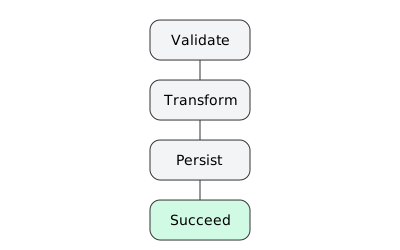
The simplest pattern is a linear sequence of tasks where each state runs after the previous one completes. This is ideal for predictable, ordered processes such as ETL pipelines or API request chains.
Use Case: Validate → Process → Store → Notify
What it is
A straight line of states that must occur in order.
When to use
Data pipelines, provisioning flows, multi API workflows where each step depends on the previous step.
ASL
{
  "StartAt": "Validate",
  "States": {
    "Validate": { "Type": "Task", "Resource": "arn:aws:lambda:...:validate", "Next": "Transform" },
    "Transform": { "Type": "Task", "Resource": "arn:aws:lambda:...:transform", "Next": "Persist" },
    "Persist": { "Type": "Task", "Resource": "arn:aws:lambda:...:persist", "End": true }
  }
}Tips
- Push data shape normalization to the earliest step so later states are simpler.
- Fail fast on validation to save cost.
- Use
ResultPathto keep payloads small between steps.
2. Parallel Pattern
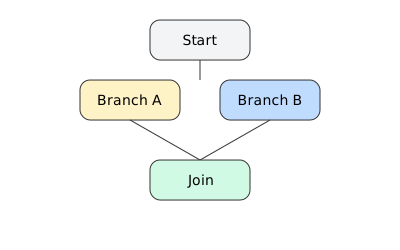
The Parallel state allows multiple branches to execute simultaneously. This pattern maximizes efficiency by running independent tasks at the same time.
Use Case: Process multiple files, run analytics jobs, or handle multi-region deployments concurrently.
What it is
Run independent branches at the same time and join when all complete or a branch fails.
When to use
Fan out independent enrichment tasks, multi region checks, writing to several backends.
ASL
{
  "StartAt": "InParallel",
  "States": {
    "InParallel": {
      "Type": "Parallel",
      "Branches": [
        { "StartAt": "A", "States": { "A": { "Type": "Task", "Resource": "arn:aws:lambda:...:a", "End": true } } },
        { "StartAt": "B", "States": { "B": { "Type": "Task", "Resource": "arn:aws:lambda:...:b", "End": true } } }
      ],
      "Next": "Join"
    },
    "Join": { "Type": "Succeed" }
  }
}Tips
- Keep branch outputs small. Use
ResultSelectorto return only required fields. - Prefer service integrations for I O bound work to avoid Lambda concurrency spikes.
- Add a
Catchon the Parallel state to centralize branch failures.
3. Map Pattern
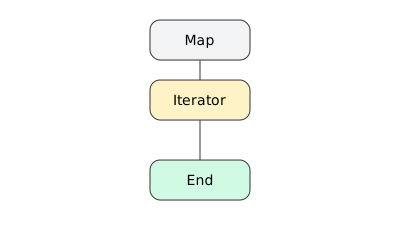
The Map state dynamically iterates over a list of items and applies the same logic to each item, either sequentially or in parallel. It scales naturally for workloads that need to handle arrays of data.
Use Case: Batch processing, image transformations, or sending notifications to a list of users.
What it is
Iterate a substate machine over each element of an array. Supports distributed concurrency and batching.
When to use
Process N files, N records, or N API calls with the same logic.
ASL
{
  "StartAt": "ProcessItems",
  "States": {
    "ProcessItems": {
      "Type": "Map",
      "ItemsPath": "$.items",
      "MaxConcurrency": 20,
      "Parameters": {
        "item.$": "$$.Map.Item.Value",
        "requestId.$": "$.requestId"
      },
      "Iterator": {
        "StartAt": "Work",
        "States": {
          "Work": { "Type": "Task", "Resource": "arn:aws:lambda:...:work", "End": true }
        }
      },
      "End": true
    }
  }
}Tips
- Use
MaxConcurrencyto protect downstream APIs. - Use
ItemSelectororParametersto trim each subpayload. - If items are very large, store in S3 and pass object keys rather than inlining data.
4. Choice Pattern
Choice states introduce conditional logic similar to “if-else” statements. This enables branching paths based on input data, ensuring workflows adapt to real-time conditions.
Start free. No AWS account needed.
ZERO AWS costs.
Download Thrubit and run your first state machine locally in under five minutes. No cloud setup, no IAM policies, no waiting.
Use Case: Route requests based on user type, data format, or error type.
What it is
Data driven branching. Behaves like if or switch.
When to use
Route based on flags, schemas, ranges, or presence of fields.
ASL
{
  "StartAt": "Route",
  "States": {
    "Route": {
      "Type": "Choice",
      "Choices": [
        { "Variable": "$.type", "StringEquals": "premium", "Next": "PremiumPath" },
        { "Variable": "$.amount", "NumericGreaterThanEquals": 1000, "Next": "HighValuePath" }
      ],
      "Default": "StandardPath"
    },
    "PremiumPath": { "Type": "Task", "Resource": "arn:aws:lambda:...:premium", "End": true },
    "HighValuePath": { "Type": "Task", "Resource": "arn:aws:lambda:...:high", "End": true },
    "StandardPath": { "Type": "Task", "Resource": "arn:aws:lambda:...:std", "End": true }
  }
}
Tips
- Always define a
Defaultpath for unexpected inputs. - Validate Choice variables exist to avoid silent misroutes.
- Keep predicate logic simple and test with representative payloads.
5. Wait Pattern
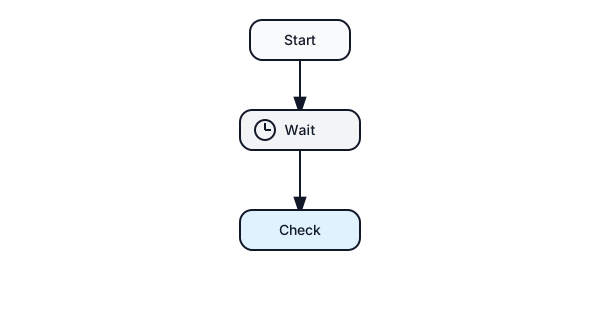
The Wait state pauses execution for a set time or until a specific timestamp. It’s essential for delaying retries, rate-limiting calls, or waiting for external systems to update.
Use Case: Wait for data synchronization or time-based triggers.
What it is
Pause for a duration or until a timestamp.
When to use
Backoff, rate limiting, pause between polls, legal hold windows.
ASL
{
  "StartAt": "Backoff",
  "States": {
    "Backoff": { "Type": "Wait", "SecondsPath": "$.sleepSeconds", "Next": "Check" },
    "Check": { "Type": "Task", "Resource": "arn:aws:lambda:...:check", "End": true }
  }
}Tips
- Use
SecondsPathso callers control delays per request. - For long waits, prefer event driven callbacks rather than polling loops.
6. Retry and Catch Pattern
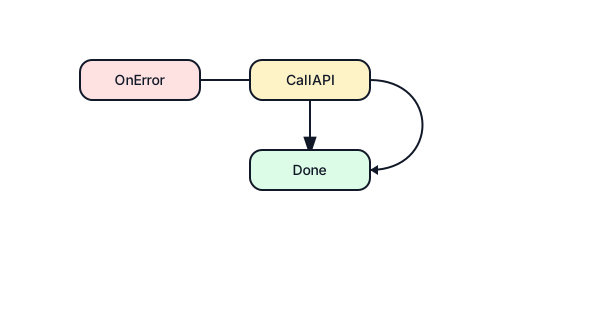
Retries automatically handle transient failures without breaking the workflow. Catch blocks manage exceptions and redirect execution to recovery states.
Use Case: Automatically retry failed API calls, then log or alert after repeated failures.
What it is
Automatic retries with backoff and circuit breaking. Catch to route failures.
When to use
Transient errors, throttling, flaky upstreams, partial fallbacks.
ASL
{
  "StartAt": "CallAPI",
  "States": {
    "CallAPI": {
      "Type": "Task",
      "Resource": "arn:aws:states:::aws-sdk:dynamodb:putItem",
      "Parameters": { "TableName": "T", "Item.$": "$.item" },
      "Retry": [
        { "ErrorEquals": ["States.Timeout","States.TaskFailed"], "IntervalSeconds": 2, "BackoffRate": 2.0, "MaxAttempts": 4 }
      ],
      "Catch": [
        { "ErrorEquals": ["States.ALL"], "ResultPath": "$.error", "Next": "OnError" }
      ],
      "Next": "Done"
    },
    "OnError": { "Type": "Task", "Resource": "arn:aws:lambda:...:notify", "End": true },
    "Done": { "Type": "Succeed" }
  }
}Tips
- Match retry policies to error classes you actually see.
- Cap
MaxAttemptsto avoid runaway cost. - Always route to a compensating or notification path on final failure.
7. Pass Pattern
The Pass state passes input directly to output without running a task. It’s commonly used for data transformations or placeholder logic during testing.
Use Case: Simplify JSON structures or temporarily stub out unimplemented functions.
What it is
No operation. Optionally transforms data.
When to use
Prototyping, reshaping payloads, injecting constants, splitting a big JSON into smaller parts.
ASL
{
  "StartAt": "Shape",
  "States": {
    "Shape": {
      "Type": "Pass",
      "Parameters": { "id.$": "$.request.id", "tenant.$": "$.context.tenant" },
      "ResultPath": "$.shaped",
      "Next": "NextTask"
    },
    "NextTask": { "Type": "Task", "Resource": "arn:aws:lambda:...:next", "End": true }
  }
}Tips
- Use
ResultPath: nullto drop large intermediate data. - Use
Parametersrather than embedding large literal JSON.
8. Succeed and Fail Patterns

The Succeed state ends execution successfully, while the Fail state terminates the workflow due to an error. Both provide clear outcomes for downstream systems.
Use Case: Mark a process complete or trigger alerts when failure conditions occur.
What it is
Explicit terminal states with success or error.
When to use
Short circuit completion or force a hard stop with a specific error.
ASL
{
  "StartAt": "Guard",
  "States": {
    "Guard": {
      "Type": "Choice",
      "Choices": [{ "Variable": "$.enabled", "BooleanEquals": true, "Next": "Run" }],
      "Default": "Stop"
    },
    "Run": { "Type": "Task", "Resource": "arn:aws:lambda:...:run", "Next": "Done" },
    "Done": { "Type": "Succeed" },
    "Stop": { "Type": "Fail", "Error": "FeatureDisabled", "Cause": "Flag is off" }
  }
}Tips
- Emit meaningful
ErrorandCausestrings to simplify alarms and dashboards. - Prefer
Succeedover ending aPassstate for clarity.
9. Nested Workflows Pattern

Nested workflows allow one Step Function to call another, making large systems modular and maintainable. Each subworkflow can be updated independently.
Use Case: A master orchestration that invokes multiple specialized workflows for billing, reporting, or auditing.
What it is
A parent workflow invokes a child workflow as a task. Promotes modularity and reuse.
When to use
Shared subflows like billing, audit trails, document processing.
ASL
{
  "StartAt": "InvokeChild",
  "States": {
    "InvokeChild": {
      "Type": "Task",
      "Resource": "arn:aws:states:::states:startExecution.sync",
      "Parameters": {
        "StateMachineArn": "arn:aws:states:...:stateMachine:Child",
        "Input.$": "$"
      },
      "Next": "WrapUp"
    },
    "WrapUp": { "Type": "Task", "Resource": "arn:aws:lambda:...:wrap", "End": true }
  }
}Tips
- Use
.syncto wait for child completion and capture its output. - Version child machines and keep contracts stable across teams.
- Enforce input and output schemas at boundaries.
10. Dynamic Parallelism Pattern
Dynamic Parallelism combines Map and Parallel concepts, letting workflows adapt the number of branches at runtime. This pattern handles scaling workloads with varying input sizes.
Use Case: Automatically fan out to process large datasets or multi-user operations dynamically.
What it is
Combine Map with inner Parallel or combine Choice produced arrays with Map to scale branches at runtime.
When to use
Variable sized fan out where each item itself requires multiple substeps.
ASL
{
  "StartAt": "MapUsers",
  "States": {
    "MapUsers": {
      "Type": "Map",
      "ItemsPath": "$.users",
      "MaxConcurrency": 10,
      "Iterator": {
        "StartAt": "UserParallel",
        "States": {
          "UserParallel": {
            "Type": "Parallel",
            "Branches": [
              { "StartAt": "Notify", "States": { "Notify": { "Type": "Task", "Resource": "arn:aws:lambda:...:notify", "End": true } } },
              { "StartAt": "Index", "States": { "Index": { "Type": "Task", "Resource": "arn:aws:lambda:...:index", "End": true } } }
            ],
            "End": true
          }
        }
      },
      "End": true
    }
  }
}
Tips
- Consider memory growth in the Map output. Persist large per item results to S3 then merge keys at the end.
- If any sub branch can fail independently, add
Catchinside the iterator to continue for other items.
Final Thoughts
Mastering these Step Function patterns enables developers to create scalable, fault-tolerant, and maintainable serverless systems. Whether you are automating batch jobs, building resilient APIs, or orchestrating multi-step data pipelines, these patterns form the foundation of robust AWS Step Function design.
Cross cutting best practices
Payload hygiene
Use InputPath, Parameters, ResultSelector, and ResultPath to strictly control payload size. Pass handles or S3 keys, not blobs.
Service integrations first
Prefer the arn:aws:states::: integrations for DynamoDB, SNS, SQS, EventBridge, SageMaker, Bedrock, and others. This reduces Lambda code and cold starts.
Idempotency
Put idempotency keys in payloads and enforce at the edges. Retries will otherwise create duplicates.
Observability
- Enable X Ray on the state machine and Lambdas.
- Emit structured logs with correlation ids.
- Add metrics filters for
ExecutionFailedand branch error counts. - Tag executions with business ids for searchability.
Testing
- Unit test state input output contracts using mock executions.
- Create small golden payloads per Choice path and per Map item shape.
- Load test with realistic concurrency on Map and Parallel.
Cost control
- Prefer Wait over sleeping in Lambdas.
- Bound retries and concurrency.
- Use Express Workflows for very high volume short lived flows and Standard for longer running or audit heavy flows.
Security
- Scope IAM to per state action level where possible.
- Do not pass secrets in state payloads. Use Secrets Manager or Parameter Store and resolve inside Task states.