
Why Step Functions Matter
The Rise and Fall of Ad Hoc Lambda Chains
When AWS Lambda launched, it revolutionized development by letting teams write small, single-purpose functions that run on demand. Developers no longer needed to manage servers or think about scaling. Each Lambda was fast, independent, and cost-efficient.
But as serverless systems evolved, those small functions started forming larger workflows. A simple file upload handler soon triggered a validation Lambda, followed by another that transformed data, and yet another that stored results in S3 or DynamoDB. What began as elegant simplicity quickly turned into a spaghetti diagram of interconnected triggers.
Developers connected Lambdas using SNS, SQS, EventBridge, or API Gateway. Each new dependency added hidden complexity. Error handling and retries were coded manually. Logging became fragmented across CloudWatch streams. A small workflow with four or five functions might still be manageable, but anything larger turned into a maintenance nightmare.
This uncontrolled expansion is what many teams jokingly call Lambda chaos. It is the inevitable result of trying to build complex orchestrations without a dedicated orchestrator.
Why Orchestration Beats Chaining
At its core, orchestration is about control and visibility. Instead of letting each Lambda dictate what happens next, you define a central flow that explicitly outlines every step, condition, and outcome. The orchestrator becomes the single source of truth for how work progresses.
In traditional chaining, the logic for transitions is buried inside code or triggers. A payment function might call a verification function directly, or publish a message to an SNS topic that another Lambda subscribes to. The sequence is hard-coded and opaque.
With orchestration, each step is declarative. You describe what should happen, in what order, and under what conditions. The orchestrator handles execution, retries, error propagation, and parallelization automatically. This approach is cleaner, easier to maintain, and far more transparent.
The Step Functions Difference
AWS Step Functions introduce this orchestration layer to the AWS ecosystem. Instead of gluing Lambdas together manually, you define your workflow as a state machine in JSON or YAML. Each “state” represents a logical step in your process, and the transitions between states form the workflow.
Think of it as a flowchart that the cloud executes for you.
Example diagram:
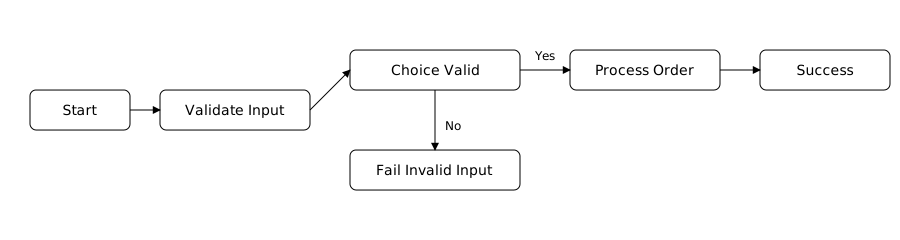
This diagram represents a simple order processing flow. Each box is a state; arrows show transitions. The workflow is easy to visualize and modify. Instead of tracing function calls through logs, you can see the entire sequence at a glance in the Step Functions console.
Deep Dive: The Core State Types
Step Functions provide several state types that act as the building blocks for any orchestration. Let’s examine them more deeply.
Task State
Executes work by calling a resource such as a Lambda function, ECS task, SageMaker job, or Glue workflow. Each Task can include retry logic, timeouts, and output transformation. [Task: GenerateThumbnail] → executes Lambda arn:aws:lambda:...:generateThumbnail
Choice State
Adds conditional branching based on input or the output of previous states. It is similar to an if-else statement in code but defined declaratively.
Start free. No AWS account needed.
ZERO AWS costs.
Download Thrubit and run your first state machine locally in under five minutes. No cloud setup, no IAM policies, no waiting.

Parallel State
Runs multiple branches at the same time. Perfect for independent tasks like fetching data from multiple APIs.

Wait State
Pauses execution for a fixed duration or until a specific time. Ideal for rate limiting or time-based actions such as “check back in 1 hour.”

Pass State
Used for debugging, shaping inputs, or inserting static data into the flow. It performs no work but is useful for scaffolding and testing workflows.
Fail and Succeed States
Explicitly define how and where a workflow ends. This makes your success and failure paths obvious and predictable.
By combining these state types, you can express nearly any business process, from a nightly data sync to a multi-step loan approval pipeline.
Error Handling, Retries, and Compensation Logic
A major advantage of Step Functions is built-in fault tolerance. Instead of surrounding every Lambda with try/catch blocks and custom error handling, you define recovery strategies directly in the state machine.
Each Task state can specify:
- Retry behavior – How many times to retry, and with what backoff rate.
- Catch blocks – Which errors to catch and where to route them.
- Timeouts – How long a state may run before being considered failed.
Example diagram of error handling:
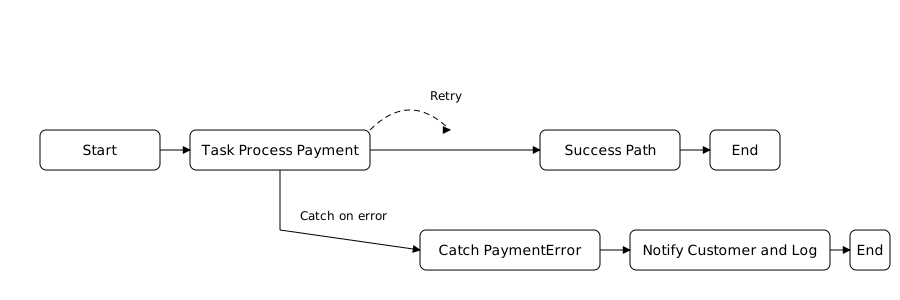
This explicit structure prevents hidden failure points. You can visualize the error path before you deploy.
Advanced workflows can even implement compensation logic, rolling back previous steps if later ones fail, such as refunding a charge or deleting a created record.
Observability and Execution History
Step Functions provide real-time visual tracking for every workflow execution. Each run displays:
- Which states have succeeded, failed, or are in progress
- Input and output data for each step
- Total duration and resource usage
This observability replaces hours of manual log chasing. You can click into a single execution and replay exactly what happened, including payloads and results.
With CloudWatch integration, you can also monitor metrics like execution count, failure rates, and latency. For enterprise systems, these metrics feed directly into operational dashboards or incident response tools.
Scaling and Cost Efficiency
Step Functions are serverless themselves. You pay only for state transitions, and the orchestration layer scales automatically. For small workflows, the cost is negligible. For large workloads, the reliability savings easily outweigh the transition cost.
Parallel states allow massive concurrency without coordination code. Combined with Lambda’s scaling capabilities, Step Functions can handle millions of executions per day without infrastructure overhead.
Integration Across AWS Services
Although Step Functions are best known for orchestrating Lambda functions, they integrate with over 220 AWS services through the Service Integrations API. You can call DynamoDB, ECS, Glue, S3, SNS, SageMaker, and even other Step Functions directly, all without writing additional Lambda wrappers.
This feature allows you to build entire data pipelines or automation processes with zero custom compute code.
Example service integration flow:
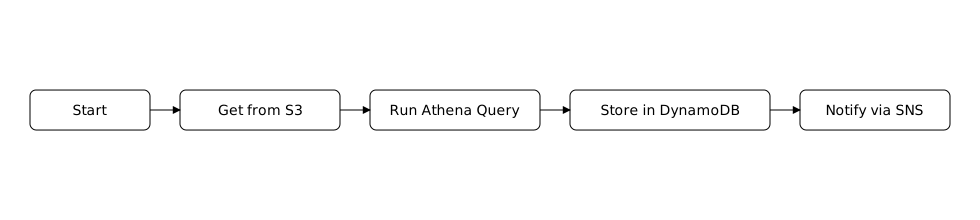
Each step uses native AWS integrations instead of Lambda calls, which improves performance and reduces cost.
Real-World Scenarios
- ETL and Data Pipelines
Automate data extraction, transformation, and loading. Step Functions coordinate S3 events, Glue jobs, and validation checks. - E-commerce Order Fulfillment
Manage multiple steps like payment, inventory update, packaging, and shipping in one transparent flow. - Machine Learning Workflows
Chain together SageMaker training, evaluation, and deployment steps with retries and metrics collection. - Approval Processes
Wait for human input using Task tokens, pause execution, and resume once an approval event is received.
These patterns demonstrate how Step Functions serve as the backbone for business logic that spans multiple AWS services.
Best Practices for Workflow Design
- Keep Lambdas single-purpose and stateless. Let Step Functions handle orchestration.
- Use input and output mappings to pass only necessary data between states.
- Leverage error catching at the state level instead of global try/catch blocks.
- Start simple, then introduce parallel and choice states as complexity grows.
- Use Versioning and Aliases for workflows in production to ensure safe rollouts.
From Chaos to Clarity
Ad hoc Lambda chaining can take you far, but it eventually collapses under its own weight. AWS Step Functions transform a tangle of triggers into a clearly defined process. They make systems self-documenting, resilient, and easier to debug.
If your team spends more time tracing errors through CloudWatch logs than delivering features, orchestration is not optional—it is essential. Step Functions are the glue that turns serverless components into a coherent system.
Visual Summary Diagrams:


The difference is more than convenience. It is the foundation of scalable, maintainable, and observable architecture in the modern AWS ecosystem.