
AWS Step Functions help developers orchestrate workflows using state machines. At the center of most workflows is the Task state, the state type responsible for actually doing work. Whether you are invoking a Lambda function, sending a message to SQS, calling Amazon Bedrock, or publishing an EventBridge event, chances are you are using a Task state.
In this guide, you will learn:
- What a Task state is
- How Task states work
- Common Task state integrations
- How to create a Task state
- Best practices for error handling and retries
- How to test Task states locally before deploying to AWS
What Is a Task State?
A Task state in AWS Step Functions represents a single unit of work inside a workflow.
Unlike states such as Choice, Pass, or Wait, which primarily control logic or flow, a Task state performs an actual action. This action usually involves invoking another AWS service or external system.
Common examples include:
- Running an AWS Lambda function
- Sending messages to Amazon SQS
- Publishing events to EventBridge
- Calling Amazon Bedrock models
- Starting ECS or Batch jobs
- Triggering nested Step Functions workflows
- Making HTTP API calls
A Task state is defined in Amazon States Language (ASL) using the "Type": "Task" property.
Here is a basic example:
{
  "StartAt": "ProcessOrder",
  "States": {
    "ProcessOrder": {
      "Type": "Task",
      "Resource": "arn:aws:lambda:us-east-1:123456789012:function:processOrder",
      "End": true
    }
  }
}In this example:
- The workflow starts at
ProcessOrder - The Task state invokes a Lambda function
- The workflow ends after the task completes
How Task States Work
A Task state typically follows this sequence:
- Receives input JSON from the previous state
- Executes an action
- Waits for the action to complete
- Returns output JSON
- Passes the output to the next state
This makes Task states the execution engine of Step Functions workflows.
Here is a simplified flow:
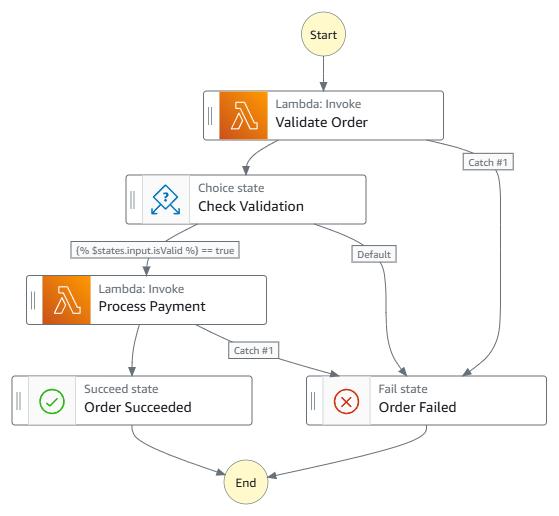
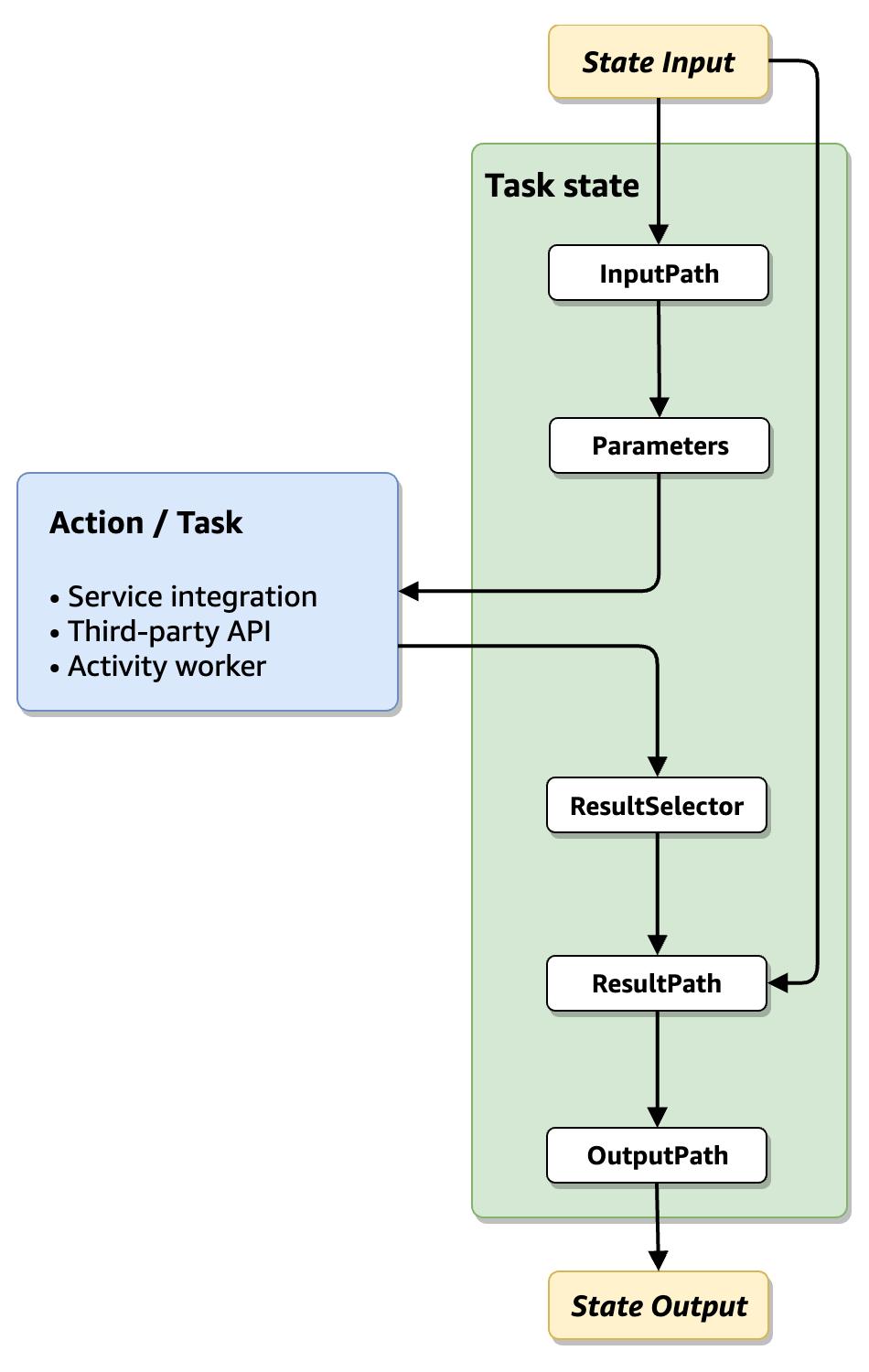
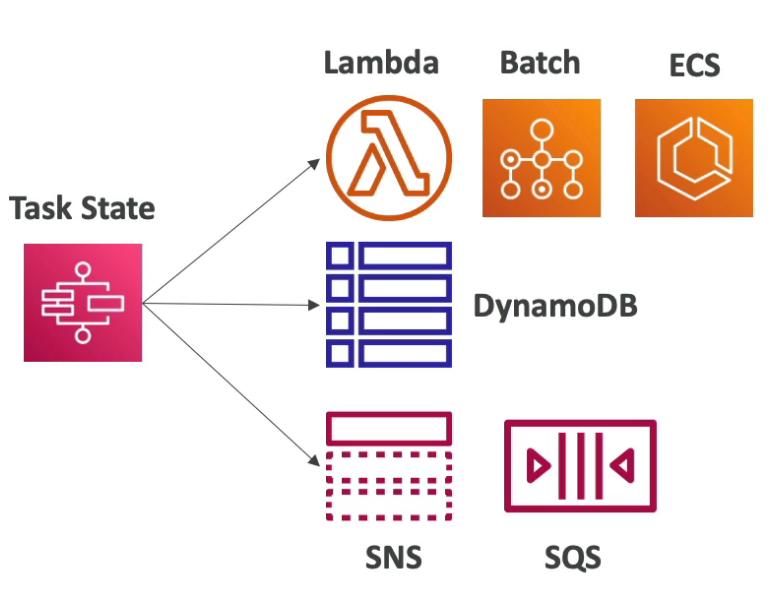
Anatomy of a Task State
Most Task states contain these properties:
| Property | Purpose |
|---|---|
Type | Defines the state type (Task) |
Resource | Specifies the AWS service or integration |
Parameters | Sends structured input |
ResultPath | Controls where output is stored |
Retry | Automatically retries failures |
Catch | Handles errors gracefully |
TimeoutSeconds | Prevents hanging executions |
Example with additional configuration:
{
  "ProcessPayment": {
    "Type": "Task",
    "Resource": "arn:aws:states:::lambda:invoke",
    "Parameters": {
      "FunctionName": "processPayment",
      "Payload.$": "$"
    },
    "Retry": [
      {
        "ErrorEquals": ["States.ALL"],
        "IntervalSeconds": 2,
        "MaxAttempts": 3,
        "BackoffRate": 2
      }
    ],
    "Catch": [
      {
        "ErrorEquals": ["States.ALL"],
        "Next": "PaymentFailed"
      }
    ],
    "End": true
  }
}Common AWS Services Used in Task States
Task states can integrate with many AWS services directly.
Start free. No AWS account needed.
ZERO AWS costs.
Download Thrubit and run your first state machine locally in under five minutes. No cloud setup, no IAM policies, no waiting.
AWS Lambda
The most common integration.
{
  "Type": "Task",
  "Resource": "arn:aws:states:::lambda:invoke"
}Use Lambda when you need:
- Custom business logic
- Data transformations
- Third-party API calls
- Lightweight processing
Amazon SQS
Send or process queue messages.
{
  "Type": "Task",
  "Resource": "arn:aws:states:::sqs:sendMessage"
}Useful for:
- Asynchronous workflows
- Decoupled systems
- Background jobs
Amazon EventBridge
Publish events to event buses.
{
  "Type": "Task",
  "Resource": "arn:aws:states:::events:putEvents"
}Ideal for:
- Event-driven architectures
- Microservices communication
- Workflow notifications
Amazon Bedrock
Invoke AI models directly inside workflows.
{
  "Type": "Task",
  "Resource": "arn:aws:states:::bedrock:invokeModel"
}Popular use cases:
- AI enrichment
- Content generation
- Classification pipelines
- Retrieval augmented generation workflows
Nested Step Functions
Start another workflow from a workflow.
{
  "Type": "Task",
  "Resource": "arn:aws:states:::states:startExecution"
}Great for:
- Modular architectures
- Reusable workflows
- Large orchestration systems
Tutorial: Creating a Task State
Let’s build a simple Task state that invokes a Lambda function.
Step 1: Create a Lambda Function
Example Node.js Lambda:
exports.handler = async (event) => {
    return {
        message: "Order processed successfully",
        orderId: event.orderId
    };
};Deploy the Lambda to AWS.
Step 2: Create the State Machine
Create this ASL definition:
{
  "StartAt": "ProcessOrder",
  "States": {
    "ProcessOrder": {
      "Type": "Task",
      "Resource": "arn:aws:states:::lambda:invoke",
      "Parameters": {
        "FunctionName": "processOrder",
        "Payload.$": "$"
      },
      "OutputPath": "$.Payload",
      "End": true
    }
  }
}Step 3: Start an Execution
Example execution input:
{
  "orderId": 1001
}Expected output:
{
  "message": "Order processed successfully",
  "orderId": 1001
}Understanding Task State Error Handling
Production workflows must handle failures properly.
AWS Step Functions provides built-in retry and catch functionality.
Retry Example
"Retry": [
  {
    "ErrorEquals": ["Lambda.ServiceException"],
    "IntervalSeconds": 1,
    "MaxAttempts": 3,
    "BackoffRate": 2
  }
]This automatically retries transient failures.
Catch Example
"Catch": [
  {
    "ErrorEquals": ["States.ALL"],
    "Next": "HandleFailure"
  }
]This redirects execution when errors occur.
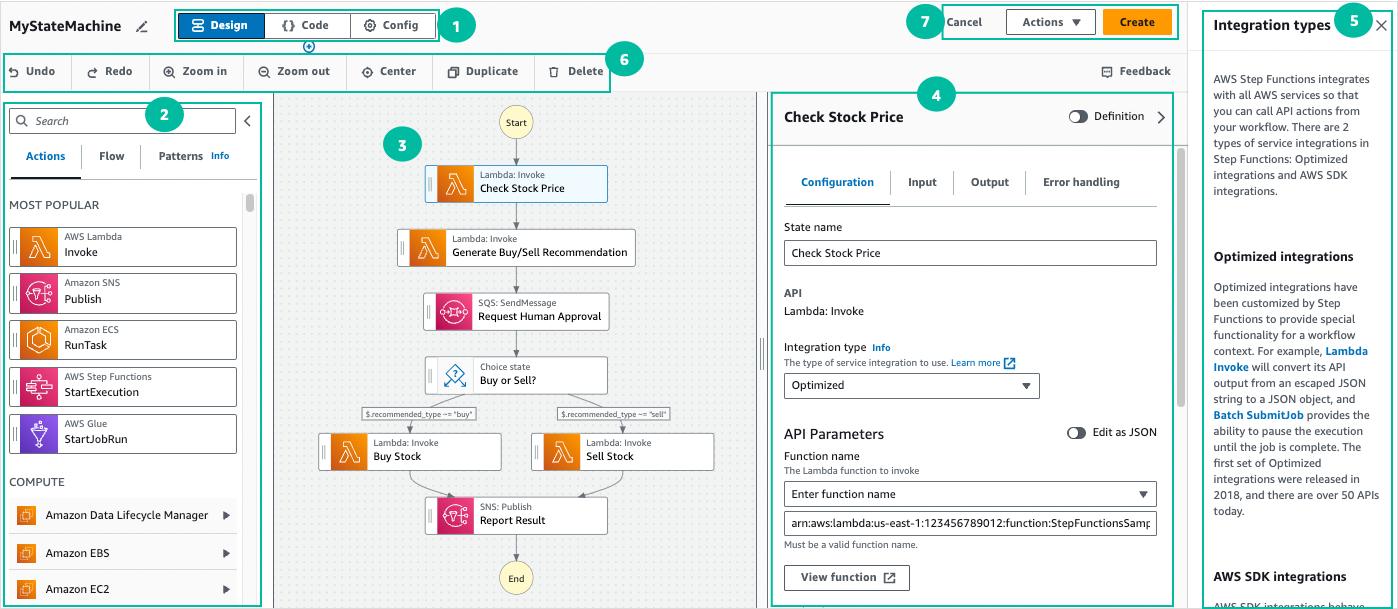
Here is an example of visual debugging and state transitions inside Step Functions workflows:


Synchronous vs Asynchronous Task States
Some Task states wait for completion while others continue asynchronously.
Synchronous Pattern
The workflow waits until the task completes.
Example:
"arn:aws:states:::lambda:invoke"Callback Pattern
The workflow pauses until an external callback returns a task token.
Example:
"arn:aws:states:::sqs:sendMessage.waitForTaskToken"This pattern is useful for:
- Human approvals
- Long-running jobs
- External systems
- AI review pipelines
Best Practices for Task States
Keep Tasks Focused
Each Task state should handle one responsibility.
Avoid giant Lambda functions that do everything.
Use Retries Carefully
Retries help with transient failures but excessive retries can increase costs and execution time.
Monitor Execution Time
Long-running Task states can become expensive and harder to debug.
Pass Only Necessary Data
Large payloads slow workflows and increase complexity.
Use:
InputPathResultPathOutputPath
to reduce payload size.
Prefer Service Integrations When Possible
Direct integrations reduce Lambda usage and simplify workflows.
For example:
- EventBridge integrations
- SQS integrations
- DynamoDB integrations
- Bedrock integrations
often eliminate the need for custom code.
Testing Task States Locally
One of the biggest challenges with Task states is debugging them in the cloud.
Every test execution may involve:
- Lambda invocations
- Step Functions state transitions
- SQS requests
- EventBridge events
- Bedrock API usage
This can quickly become expensive and slow during development.
Modern orchestration teams increasingly test workflows locally before deploying.
Platforms like Thrubit allow developers to:
- Run Step Functions locally
- Execute real Lambda functions without deployment
- Test Task states visually
- Mock AWS integrations
- Debug Bedrock, SQS, EventBridge, and DynamoDB interactions
- Iterate instantly with ZERO AWS costs during development
This local-first approach dramatically improves workflow development speed while reducing cloud debugging costs.
Why Task States Matter
Task states are the operational core of AWS Step Functions.
They connect workflows to:
- Business logic
- AI services
- Event systems
- Queues
- APIs
- Databases
- External platforms
Without Task states, Step Functions would only manage flow control. Task states turn workflows into fully functioning distributed systems.
As organizations continue adopting serverless and event-driven architectures, understanding Task states becomes essential for building scalable AWS workflows.